





resmush is an R package for optimizing local and online image files, individually or in entire directories, with the reSmush.it API. The API is free for personal use and does not require an API key. reSmush.it is also available through WordPress and other tools.
The reSmush.it API provides:
[!NOTE]
This package is stable and maintained on a best-effort basis. I currently prioritize CRAN compatibility, bug fixes and regressions over new features.
Install resmush from CRAN with:
install.packages("resmush")Check the documentation for the development version at https://dieghernan.github.io/resmush/dev/.
You can install the development version of resmush from GitHub with:
# install.packages("pak")
pak::pak("dieghernan/resmush")
Alternatively, install resmush from r-universe:
# Install resmush in R:
install.packages(
  "resmush",
  repos = c(
    "https://dieghernan.r-universe.dev",
    "https://cloud.r-project.org"
  )
)Optimize and download an online JPEG image with
resmush_url():
library(resmush)
url <- "https://dieghernan.github.io/resmush/img/jpg_example_original.jpg"
resmush_url(
url,
outfile = "man/figures/jpg_example_compress.jpg",
overwrite = TRUE
)
#> ══ resmush summary ═════════════════════════════════════════════════════════════
#> ℹ Input: 1 URL, 178.7 Kb total.
#> ✔ Optimized 1 URL: size is now 45 Kb (was 178.7 Kb). Saved 133.7 Kb (74.82%).
#> Saved result in directory 'man/figures'. (a)
(a)
 (b)
(b)
Use the qlty argument to adjust the JPEG quality level.
For best results, use values above 90.
# Use a low JPEG quality level.
resmush_url(
  url,
  outfile = "man/figures/jpg_example_compress_low.jpg",
  overwrite = TRUE,
  qlty = 3
)
#> ══ resmush summary ═════════════════════════════════════════════════════════════
#> ℹ Input: 1 URL, 178.7 Kb total.
#> ✔ Optimized 1 URL: size is now 2.2 Kb (was 178.7 Kb). Saved 176.4 Kb (98.74%).
#> Saved result in directory 'man/figures'.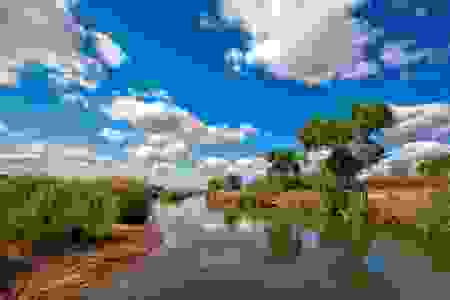
qlty = 3).
When results are available, all optimization functions invisibly
return a data frame with one row per result and columns containing
source and destination paths, formatted and raw file sizes, compression
ratios and status notes. They return NULL otherwise.
Successful API calls also write the optimized files to disk. The
following example shows the result for a local image file:
png_file <- system.file("extimg/example.png", package = "resmush")

# Copy to a temporary file for this example.
tmp_png <- tempfile(fileext = ".png")
file.copy(png_file, tmp_png, overwrite = TRUE)
#> [1] TRUE

summary <- resmush_file(tmp_png, overwrite = TRUE)

tibble::as_tibble(summary[, -c(1, 2)])
#> # A tibble: 1 × 6
#>   src_size dest_size compress_ratio notes src_bytes dest_bytes
#>   <chr>    <chr>     <chr>          <chr>     <dbl>      <dbl>
#> 1 239.9 Kb 70.7 Kb 70.54% OK 245618 72356Several other R packages provide image optimization tools:
xfun::tinify(): Similar to resmush_file()
but uses TinyPNG and
requires an API key.xfun::optipng(): Compresses local files using
OptiPNG. The program must be installed locally.xfun::optipng() but with more options.
It requires additional local software.| Tool | CRAN | Additional software | Online images | API key required | Limits |
|---|---|---|---|---|---|
xfun::tinify() |
Yes | No | Yes | Yes | 500 compressions per month (free tier) |
xfun::optipng() |
Yes | Yes | No | No | None |
| tinieR | No | No | Yes | Yes | 500 compressions per month (free tier) |
| tinyimg | Yes | Yes (Rust toolchain) | No | No | None |
| optout | No | Yes | No | No | None |
| resmush | Yes | No | Yes | No | Personal use only. Files smaller than 5 MB. |
Table 1: R packages: comparison of image optimization alternatives.
| Tool | PNG | JPEG | GIF | BMP | TIFF | WebP | |
|---|---|---|---|---|---|---|---|
xfun::tinify() |
✅ | ✅ | ❌ | ❌ | ❌ | ✅ | ❌ |
xfun::optipng() |
✅ | ❌ | ❌ | ❌ | ❌ | ❌ | ❌ |
| tinieR | ✅ | ✅ | ❌ | ❌ | ❌ | ✅ | ❌ |
| tinyimg | ✅ | ✅ | ❌ | ❌ | ❌ | ❌ | ❌ |
| optout | ✅ | ✅ | ❌ | ❌ | ❌ | ❌ | ✅ |
| resmush | ✅ | ✅ | ✅ | ✅ | ✅ | ❌ | ❌ |
Table 2: R packages: supported formats.
In practice, resmush is designed for quick image optimization with minimal setup, including support for online image files and formats such as GIF, BMP and TIFF. Packages such as tinyimg may be a better fit for fully local workflows focused on PNG and JPEG optimization and fine-grained control over compression settings.
Hernangómez D (2026). resmush: Optimize and Compress Image Files with reSmush.it. doi:10.32614/CRAN.package.resmush. https://dieghernan.github.io/resmush/.
A BibTeX entry for LaTeX users:
@Manual{R-resmush,
  title = {{resmush}: Optimize and Compress Image Files with {reSmush.it}},
  doi = {10.32614/CRAN.package.resmush},
  author = {Diego Hernangómez},
  year = {2026},
  version = {1.0.2},
  url = {https://dieghernan.github.io/resmush/},
  abstract = {Optimize and compress local and online image files with the reSmush.it API <https://resmush.it/api/>. Process individual files or entire directories. The API is free for personal use, accepts files smaller than 5 MB and supports PNG, JPEG, GIF, BMP and TIFF files.},
}