

The shades package allows colours to be manipulated
easily in R. Properties such as brightness and saturation can be quickly
queried, changed or varied, and perceptually uniform colour gradients
can be constructed. It plays nicely with the pipe operator from the popular
magrittr package, or the similar native one introduced
in R 4.1.0, and fits naturally into that paradigm. It can also be used
with ggplot2
scales.
The package is available on CRAN. You can also
install the current development version from GitHub using the
remotes package:
# install.packages("remotes")
remotes::install_github("jonclayden/shades")
Feedback on the package or suggestions are welcome, either by filing an issue or by email.
Colours are represented in R using CSS-style hex
strings, but there is also a dictionary of predefined named colours
such as "red" and "blue". Either of these may
be passed to most graphics functions, but creating variations on a
particular colour can be awkward.
The shades package defines a simple class,
shade, which uses exactly this same convention and is
entirely compatible with built-in colours, but it also stores
information about the coordinates of the colours in a particular colour space.
library(shades)
red <- shade("red")
print(unclass(red))
##       red
## "#FF0000"
## attr(,"space")
## [1] "sRGB"
## attr(,"coords")
##      R G B
## [1,] 1 0 0
From here, the package switches between colour spaces as required, allowing various kinds of colour manipulation to be performed straightforwardly. For example, let’s find the saturation level of a few built-in colours.
saturation(c("papayawhip","lavenderblush","olivedrab"))
## [1] 0.1647100 0.0588200 0.7535287
Now let’s consider a colour gradient stepping through two different colour spaces, which we might want to use as a palette or colour scale.
swatch(gradient(c("red","blue"), 5))
swatch(gradient(c("red","blue"), 5, space="Lab"))
Here, we are using the swatch function to visualise a
set of colours as a series of squares. Named colours like “red” are
labelled automatically. Notice the more uniform appearance of the
gradient when it traverses through the Lab colour
space.
Similarly, we can create a set of new colours by changing the brightness and saturation levels of some base colours, and make the code more readable by using the pipe operator.
c("red","blue") |> brightness(0.6) |> saturation(seq(0,1,0.25)) |> swatch()
This operation takes the original two colours, reduces their
brightness to 60%, assigns a whole series of saturation levels to the
result, and then passes it to swatch for visualisation.
Notice that the pipeline is combinative (like the base function
outer), returning each combination of parameters in a
multidimensional array. The final shades are arranged in two rows by
swatch, for convenience, and automatically labelled with
the saturation values.
Note that NA can be used as a pass-through value:
"cornflowerblue" |> saturation(c(NA,seq(0,1,0.25))) |> swatch()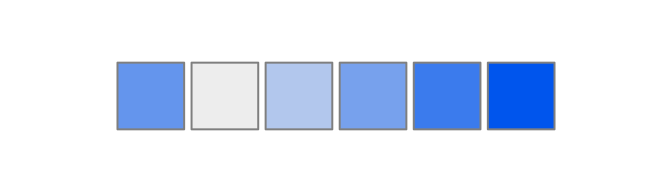
Any of these gradients can be directly passed to a standard graphical
function, to be used as a colour scale. However, when choosing a colour
scale, it is helpful to bear in mind that some viewers may have a colour
vision deficiency (colour blindness), making it harder for them to
distinguish certain colours and therefore to see a continuous scale. The
dichromat function can be used to simulate this.
rev(grDevices::rainbow(9)) |> dichromat() |> swatch()
gradient("viridis",9) |> dichromat() |> swatch()
Here we are using the built-in “viridis” colour map, developed for Python’s
matplotlib, which was specifically designed to appear
continuous under as many conditions as possible. When shown with
simulated red-blindness, the default for dichromat, it is
clearly much more interpretable than a typical rainbow palette generated
by R’s built-in graphics functions.
The package also supports colour mixing, either additively (as with light) or subtractively (as with paint). For example, consider additive mixtures of the three primary RGB colours.
c("red", addmix("red","green"), "green", addmix("green","blue"), "blue") |> swatch()
Similarly, we can subtractively combine the three secondary colours.
c("cyan", submix("cyan","magenta"), "magenta", submix("magenta","yellow"), "yellow") |> swatch()
A “light mixture” infix operator, %.)%, and a “paint
mixture” infix operator, %_/%, are also available.
("red" %.)% "green") == "yellow"
## [1] TRUE
("cyan" %_/% "magenta") == "blue"
## [1] TRUE
Finally, you can calculate perceptual distances to a reference colour, as in
distance(c("red","green","blue"), "red")
## [1] 0.00000 86.52385 53.07649The shades package can be used with the popular ggplot2
graphics library in different ways, with different levels of
integration. Firstly, gradients from this package can be used as
ggplot2 colour scales through the manual scale functions;
for example,
library(shades); library(ggplot2)
mtcars$cyl<- factor(mtcars$cyl)
ggplot(mtcars, aes(cyl,mpg,fill=cyl)) + geom_boxplot() + scale_fill_manual(values=unclass(gradient("viridis",3)))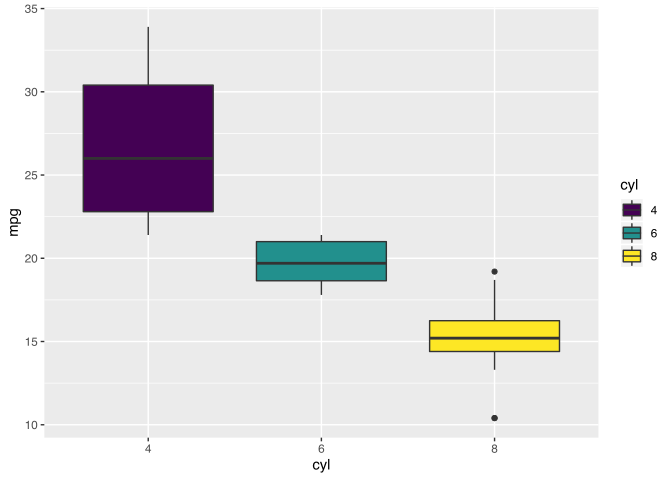
This does not require the two packages to know anything about each
other (although unclass() is needed with recent versions of
ggplot2 due to its internal type handling). This approach
is flexible and powerful, but it doesn’t easily allow existing
ggplot2 scales to be modified using the colour manipulation
functions from shades. As of shades version
1.3.0, it is also possible to call the package’s colour property
functions directly on scales, so that (for example), we can darken all
colours in an existing scale slightly:
ggplot(mtcars, aes(cyl,mpg,fill=cyl)) + geom_boxplot() + scale_fill_brewer(type="qual")
ggplot(mtcars, aes(cyl,mpg,fill=cyl)) + geom_boxplot() + lightness(scale_fill_brewer(type="qual"), delta(-20))
Notice here that we have chosen to use the delta()
function, which is available in all colour property functions, to
request a relative reduction of 20 to the original lightness of
each colour in the scale. We could also have given a literal value to
fix the lightness of all colours to a certain level.
Similarly, shades-derived or adjusted palettes can be
used with the tinyplot package, which accepts a palette
function such as that generated by gradient():
library(tinyplot)
with(mtcars, tinyplot(mpg, by=cyl, type="boxplot", palette=gradient("viridis")))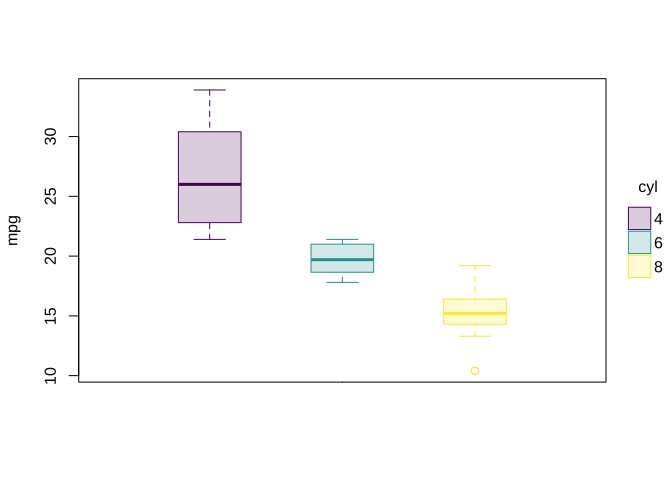
with(mtcars, tinyplot(mpg, by=cyl, type="boxplot", palette=lightness(gradient("viridis"), delta(-20))))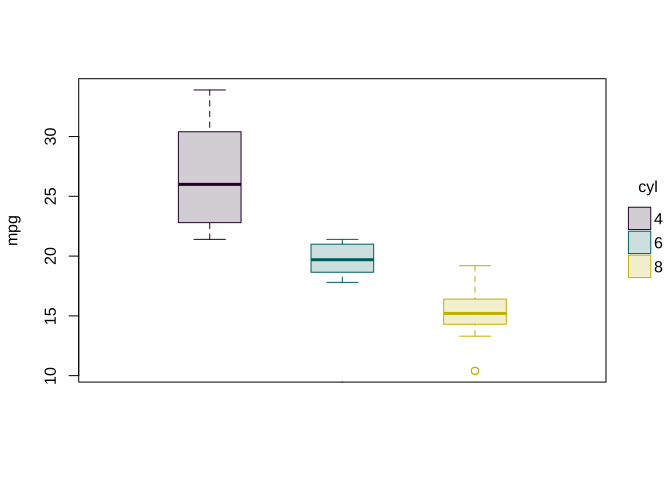
The shades package aims to bring together a range of
colour manipulation tools and make them easy to use. However, there are
several other packages available that can do similar things, sometimes
in slightly different ways. These include
grDevices package, which is shipped with R and used
as the basis for shades;colorspace
package, which provides formal colour classes and transformations
between spaces;munsell,
which interprets colours in Munsell notation and does some colour
manipulation;viridis
and RColorBrewer,
which provide the colour scales from matplotlib and
ColorBrewer;dichromat,
which provides another implementation of the dichromat
function (a duplication which I didn’t discover until after writing this
package’s version!); andcolorblindr,
which provides alternative tools for simulating colour blindness in
figures.This package was also partly influenced by Colors.jl, a colour manipulation package for Julia.